
Our Short List of 3

- Best for: A first home lab that needs more gigabit ports without any setup.
- 8 x 10/100/1000 Mbps RJ45 ports
- Plug and play, no configuration required
- Fanless metal case with shielded ports
- 16 Gbps switching capacity

- Best for: Home lab builders who want VLAN segmentation without paying for a fully managed switch.
- 8 gigabit Ethernet ports
- Easy Smart management via web interface and free software
- VLAN support with up to 32 VLANs
- QoS, VLAN, IGMP and LAG support
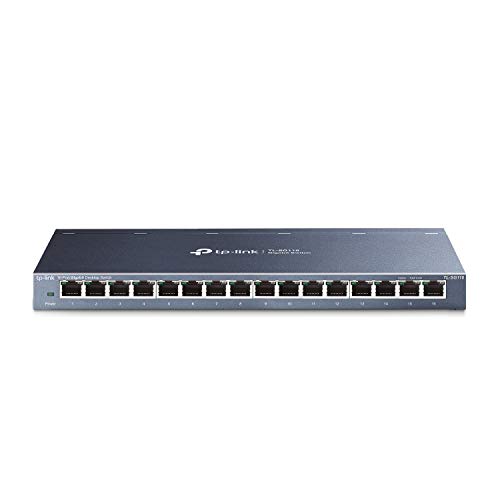
- Best for: Larger labs with a NAS, several mini PCs, access points and a printer on one switch.
- 16 gigabit Ethernet ports
- Fanless steel housing
- 10 W maximum power from a 12 V, 1 A adapter
- 4.1 Mb packet buffer
All 5 Picks at a Glance
| Product | Specs | Action |
|---|---|---|
| TP-Link TL-SG108 |
| Check price on Amazon |
| TP-Link TL-SG108E |
| Check price on Amazon |
| TP-Link TL-SG116 |
| Check price on Amazon |
 TP-Link TL-SG108S-M2 |
| Check price on Amazon |
 TP-Link TL-SG1005P |
| Check price on Amazon |
🛒 Best Price Today on Amazon
Prime members get fast, free shipping on everything above, plus member-only deals. New members get a 30-day free trial — cancel anytime.
A home lab grows one device at a time. A router with four ports covers the first server and the first access point, then the NAS arrives, then a second mini PC, then a camera, and suddenly every new box needs a cable and there is nowhere to plug it in. The real decision is not which switch is fastest on paper. It is which switch matches the network you are actually building: a flat network that just needs more ports, or a segmented one where the lab, the smart home gear and the guest Wi-Fi stay apart.
This guide is for home lab builders at every stage, from a first rack on a desk to a small rack with a NAS, virtual machines and a few cameras. It also suits anyone wiring a home office that has outgrown the router. The five switches below were chosen from the name and specifications on the Amazon product page, covering unmanaged gigabit, VLAN-ready managed, 16-port, multi-gig and PoE+ models.
Quick Picks
As an Amazon Associate we earn from qualifying purchases
| Product | Best for | Key spec from title |
|---|---|---|
| TP-Link TL-SG108 | First lab that needs more ports | 8 gigabit ports, unmanaged, fanless metal |
| TP-Link TL-SG108E | Splitting a lab into VLANs | 8 gigabit ports, Easy Smart managed, VLAN |
| TP-Link TL-SG116 | Labs with many wired devices | 16 gigabit ports, fanless steel |
| TP-Link TL-SG108S-M2 | NAS and servers with 2.5G ports | 8 x 2.5G ports, 40 Gbps switching |
| TP-Link TL-SG1005P | Powering access points and cameras | 4 PoE+ ports, 65 W PoE budget |
How to Choose
Managed or unmanaged: VLANs decide it
An unmanaged switch forwards traffic and asks nothing of you, which is all a simple lab needs. A managed switch adds a web interface where you can create VLANs, and that changes what the lab can do. With VLANs, the virtual machines sit on one network, the smart bulbs and cameras on another, and the guest Wi-Fi on a third, so a compromised camera cannot reach the NAS. If your router supports VLANs and you plan to isolate anything, buy the managed switch now. Moving a running lab from an unmanaged switch to a managed one later means re-cabling and re-addressing everything, which is the kind of weekend job nobody enjoys twice.
Count ports, then add two
Count every device that will ever take a cable: router uplink, NAS, servers, desktop, printer, access points, cameras, game console, TV. Then add two spare ports for the next device, because a home lab never stays the size it started. Eight ports cover a first lab with room to spare. Sixteen ports suit a rack with a NAS, several mini PCs and a couple of access points. Remember that one port always goes to the router uplink, so an eight-port switch really offers seven device ports. Buying the bigger switch costs less than buying a second small one and daisy-chaining it later.
Match speed to the NAS, not the internet
Internet speed rarely decides switch speed, because most home connections are slower than a gigabit link. The NAS decides it. If the NAS has a 2.5G port and the switch only offers gigabit, every file transfer caps at gigabit speed and the faster port goes to waste. The same applies to a desktop with a 2.5G network card and to Wi-Fi 6 access points with 2.5G uplinks. A 2.5G switch works over ordinary Cat5e cable, so no re-cabling is needed. If every device in the lab is gigabit, a gigabit switch is the sensible buy, and the money saved goes toward the next drive.
Where cheap switches cut corners
The corners that matter in a home lab are noise, heat and power. A fanless metal switch sits silently on a desk and sheds heat through its case, while a plastic switch with a small fan hums in a quiet room and gathers dust. Check the maximum power draw on the spec sheet, because a switch that idles at ten watts costs more over a year than one that idles at three. Check whether the listing mentions loop prevention, which stops a mis-plugged cable from flooding the network. Finally, know that TP-Link and NETGEAR reuse model names across hardware revisions, so confirm the revision on the label when the box arrives.
The 5 Best Options
TP-Link TL-SG108
- Best for: A first home lab that needs more gigabit ports without any setup.
- 8 x 10/100/1000 Mbps RJ45 ports
- Plug and play, no configuration required
- Fanless metal case with shielded ports
- 16 Gbps switching capacity
A first home lab that needs more gigabit ports without any setup.
It is unmanaged, so it cannot create VLANs; check the hardware version on the label, since the model ships in several revisions.
The TL-SG108 is the switch most first labs should start with. Eight gigabit ports in a fanless metal case cover a router uplink, a NAS, a server or two, a desktop and a printer, with a spare port left over. Loop prevention guards against the classic mistake of plugging both ends of a cable into the same switch, and the 16 KB jumbo frames help large file transfers to the NAS. It draws little power, makes no noise, and needs no configuration at all, so it disappears into the lab and stays out of the way.
TP-Link TL-SG108E
- Best for: Home lab builders who want VLAN segmentation without paying for a fully managed switch.
- 8 gigabit Ethernet ports
- Easy Smart management via web interface and free software
- VLAN support with up to 32 VLANs
- QoS, VLAN, IGMP and LAG support
Home lab builders who want VLAN segmentation without paying for a fully managed switch.
It is Easy Smart managed, not fully managed, so it lacks a command line and some enterprise features; confirm your router supports VLANs before buying.
The TL-SG108E looks identical to the unmanaged TL-SG108 and costs little more, but it adds the one feature that changes a home lab: VLANs. A web interface lets you split the eight ports into separate networks, so the lab machines, the IoT devices and the guest network stop talking to each other. It also supports QoS, IGMP snooping for multicast traffic and link aggregation for a bonded NAS connection. For anyone whose router already handles VLANs, this is the cheapest honest step into a segmented lab.
TP-Link TL-SG116
- Best for: Larger labs with a NAS, several mini PCs, access points and a printer on one switch.
- 16 gigabit Ethernet ports
- Fanless steel housing
- 10 W maximum power from a 12 V, 1 A adapter
- 4.1 Mb packet buffer
Larger labs with a NAS, several mini PCs, access points and a printer on one switch.
It has no loop prevention on its spec sheet, and at sixteen ports a managed model is worth considering if VLANs are on the roadmap.
When eight ports stop being enough, the TL-SG116 gives a lab sixteen gigabit ports in a single fanless steel box. It suits a rack shelf holding a NAS, several mini PCs, access points and a printer, all landing in one place instead of spread across two daisy-chained switches. The steel housing stays silent, a physical security lock slot keeps it attached to the rack, and it mounts on a desk or a wall. It is the straightforward way to stop counting ports.
TP-Link TL-SG108S-M2
- Best for: Labs where the NAS, desktop or access points have 2.5G ports and gigabit is the bottleneck.
- 8 x 2.5G ports, auto-negotiating 100 Mbps, 1 Gbps and 2.5 Gbps
- 40 Gbps switching capacity
- 12 KB jumbo frames
- Loop prevention
Labs where the NAS, desktop or access points have 2.5G ports and gigabit is the bottleneck.
It is unmanaged, so it offers no VLANs; confirm each device actually has a 2.5G port, or the extra speed goes unused.
A gigabit switch wastes a 2.5G port, and the TL-SG108S-M2 exists to stop that waste. All eight ports run at 100 Mbps, 1 Gbps or 2.5 Gbps, so a NAS with a 2.5G port, a desktop with a 2.5G card and a Wi-Fi 6 access point with a 2.5G uplink all run at full speed over the Cat5e cable already in the walls. Forty gigabits per second of switching capacity keeps the ports from bottlenecking each other, and the fanless case keeps the desk quiet. It is the right upgrade once the storage, not the internet, is the slow part of the lab.
TP-Link TL-SG1005P
- Best for: Powering access points and cameras over the same cable that carries their data.
- 5 gigabit Ethernet ports
- 4 PoE+ ports with a 65 W PoE budget
- Plug and play, no configuration required
- Desktop form factor
Powering access points and cameras over the same cable that carries their data.
The 65 W budget is shared across four ports, so add up the draw of every powered device before buying; the fifth port carries no power.
Access points and cameras need power as well as data, and the TL-SG1005P delivers both. Four of its five gigabit ports supply PoE+ with a 65 W budget, enough for a couple of access points and a camera or two, while the fifth port takes the router uplink. One cable per device replaces a tangle of power adapters, and placement follows the cable run instead of the nearest outlet. For a lab that is adding its first ceiling access point or outdoor camera, this is the smallest switch that solves the power problem properly.
Which One Fits Your Situation
Your first lab, on a desk, on a budget
Start with the TL-SG108. It adds seven usable ports to a router, stays silent and cool, and asks for nothing in return. The money saved against a managed switch goes toward a drive for the NAS or a second mini PC. If the lab later needs VLANs, the TL-SG108E is a drop-in replacement in the same size and shape, and the TL-SG108 can move to the far end of the house as a second switch.
You want the IoT gear away from the NAS
Buy the TL-SG108E and pair it with a router that supports VLANs. Put the virtual machines and the NAS on one VLAN, the cameras and smart home gear on another, and the guest Wi-Fi on a third. The unmanaged switches in this guide cannot do this at all, so this is the one situation where the managed model is not optional. Keep the TL-SG108 for the desk at the other end of the house.
The NAS is the centre of the lab
Buy the TL-SG108S-M2 if the NAS has a 2.5G port, because a gigabit switch would cap every transfer. If the NAS is gigabit-only, the TL-SG116 is the better buy, giving sixteen ports for the NAS, the servers, the access points and the printer in one box. Either way, put the NAS on the fastest port the switch offers and keep the uplink to the router on its own port.
Cameras and access points are joining the lab
Buy the TL-SG1005P. Four PoE+ ports cover a ceiling access point, an outdoor camera and a second access point, with one port left for the router uplink. Add up the power draw first, since the 65 W budget is shared. If the camera count grows past four powered devices, the answer is a bigger PoE switch, not a second small one.
Common Mistakes
- Buying an eight-port switch and forgetting the router uplink takes one port, leaving seven for devices.
- Choosing a gigabit switch when the NAS already has a 2.5G port, then wondering why transfers cap at gigabit speed.
- Buying a PoE switch without adding up the power draw of every camera and access point against the shared budget.
- Daisy-chaining two small unmanaged switches instead of buying one sixteen-port switch, which adds a failure point and a bottleneck.
- Picking a managed switch before checking whether the router supports VLANs, which leaves the management features stranded.
Frequently Asked Questions
Do I need a managed switch for a home lab?
Not at first. An unmanaged switch is enough while the lab is one flat network. A managed switch becomes worth it when you want to isolate devices, such as keeping cameras and smart home gear on a separate VLAN from the NAS and virtual machines. If your router supports VLANs and isolation is on your roadmap, the TL-SG108E is the affordable way in.
How many ports does a home lab switch need?
Count every wired device, add one port for the router uplink, then add two spares for the next device. Most first labs fit on eight ports. A lab with a NAS, several mini PCs, access points and a printer usually needs sixteen. Running out of ports mid-build means a second switch and a daisy-chain, which is the outcome the spare ports prevent.
Is a 2.5G switch worth it over gigabit?
It is worth it when at least one device has a 2.5G port, usually the NAS, a desktop network card or a Wi-Fi 6 access point. The switch runs over ordinary Cat5e cable, so no re-cabling is needed. If every device in the lab is gigabit, a 2.5G switch adds speed nobody can use, and a gigabit model is the better buy.
Can one switch power my access points and cameras?
A PoE+ switch can, within its power budget. The TL-SG1005P offers four PoE+ ports sharing 65 W, which covers a couple of access points and a camera or two. Check the draw of each device on its own spec sheet and add them up. If the total passes the budget, the devices will not all power on, and a switch with a larger budget is the answer.







Write Your Review
No reviews yet. Be the first to share your experience!