
🛒 Best Price Today on Amazon
Prime members get fast, free shipping on everything above, plus member-only deals. New members get a 30-day free trial — cancel anytime.
- Top 3 Picks
- Quick Comparison
- How We Chose
- 1. Lexar NM790 1TB with Heatsink – Best for mid-range 1TB value
- 2. WD_BLACK SN850P 1TB – Best for Sony-licensed 1TB expansion
- 3. SIX NVME M.2 SSD PCIe 4.0 1TB – Best for the lowest-cost workable entry
- 4. fanxiang 1TB PS5 NVMe with Heatsink – Best for a budget drive that arrives ready to fit
- 5. MOVE SPEED HB7450 2TB – Best for mid-priced 2TB with TLC NAND
- 6. fanxiang S660 1TB – Best for the cheapest drive with cooling included
- 7. WD_BLACK SN850P 2TB – Best overall for most PS5 owners
- 8. fanxiang 1TB Gen4 4800MB/s – Best for cheap secondary storage
- 9. Samsung 990 PRO 2TB with Heatsink – Best for brand pedigree and warranty confidence
- 10. Acer Predator GM7 1TB – Best for fast 1TB at a budget price
- 11. Lexar NM790 4TB with Heatsink – Best for maximum capacity
- 12. fanxiang 2TB PS5 NVMe with Heatsink – Best for large capacity at mid-tier money
- How to Choose
- Frequently Asked Questions
- Final Recommendation
Top 3 Picks
Best overall: The WD_BLACK 2TB SN850P is the pick that suits the widest range of PS5 owners. It is officially licensed by Sony for the console, ships with a factory-fitted heatsink designed to match the expansion bay, and carries a 2TB capacity that keeps a large library installed. The Lexar 4TB NM790 is the alternative for anyone who wants maximum space rather than the Sony-licensed label.
Best budget: The SIX NVME M.2 SSD PCIe 4.0 1TB is the lowest-cost entry point that still hits the console’s sequential speed requirement, rated up to 7,350MB/s. The fanxiang S660 is the cheapest option that actually comes with a heatsink in the box, which matters more than peak speed on a PS5.
Best premium: The Lexar 4TB NM790 is the best pick for players who never want to uninstall a game again, combining a 4TB capacity with 7,400MB/s reads and a slim heatsink that clears the expansion bay. The Samsung 990 PRO 2TB with heatsink is the choice for buyers who prioritise brand pedigree and long-term warranty support over raw capacity per dollar.
Quick Comparison
Every drive below is an M.2 2280 NVMe unit that physically fits the PS5 expansion slot. The column that matters most is not peak speed — it is whether a heatsink is included, because Sony does not supply one and the console’s thermal design assumes the drive brings its own.
| Product | Best for | Key specs | Price tier |
|---|---|---|---|
| Lexar 1TB NM790 (heatsink) | Balanced mid-range value | 1TB, PCIe Gen 4×4, M.2 2280, 7400/6500 MB/s, heatsink included | Mid-range |
| WD_BLACK 1TB SN850P | Sony-licensed 1TB upgrade | 1TB, PCIe Gen 4, up to 7300 MB/s, official PS5 heatsink | Mid-range |
| SIX NVME M.2 1TB PCIe 4.0 | Cheapest workable entry | 1TB, PCIe 4.0, M.2 2280, up to 7350 MB/s | Budget |
| fanxiang 1TB PS5 (heatsink) | Budget pick with heatsink pre-fitted | 1TB, PCIe Gen 4, up to 7000 MB/s, heatsink included | Mid-range |
| MOVE SPEED HB7450 2TB | Mid-priced 2TB with TLC NAND | 2TB, PCIe 4.0 NVMe, M.2, TLC NAND, heatsink included | Mid-range |
| fanxiang S660 1TB | Absolute lowest cost with cooling | 1TB, PCIe 4.0, up to 5000 MB/s, heatsink included, SLC cache | Budget |
| WD_BLACK 2TB SN850P | Best overall for most owners | 2TB, PCIe Gen 4, up to 7300 MB/s, official PS5 heatsink | Premium |
| fanxiang 1TB Gen4 (4800 MB/s) | Secondary/backup storage | 1TB, PCIe Gen 4, up to 4800 MB/s, 3D NAND SLC cache | Budget |
| Samsung 990 PRO 2TB (heatsink) | Brand pedigree and warranty support | 2TB, PCIe Gen 4, M.2 2280, heatsink included | Premium |
| Acer Predator GM7 1TB | Fast 1TB at a budget price | 1TB, PCIe Gen 4 x4 NVMe 2.0, M.2 2280, up to 7400 MB/s | Budget |
| Lexar 4TB NM790 (heatsink) | Maximum capacity | 4TB, PCIe Gen 4×4, M.2 2280, 7400/6500 MB/s, heatsink included | Premium |
| fanxiang 2TB PS5 (heatsink) | Large capacity at mid-tier money | 2TB, PCIe Gen 4, up to 7100 MB/s, heatsink included | Premium |
How We Chose
This list was assembled from published manufacturer specifications, Sony’s own stated requirements for PS5 M.2 expansion, and the documented behaviour of these drive families in the console. No physical testing, benchmarking or ownership of the products is claimed anywhere in this article — everything here is a specification and compatibility analysis, and where a figure is uncertain it is described by spec class rather than invented.
The first filter was physical fit. The PS5 expansion bay accepts M.2 2280 form-factor drives, with a strict length limit and a shallow clearance above the board. Drives that ship with a tall aftermarket heatsink can foul the bay cover, which is why heatsink height and the inclusion of a heatsink in the box were weighted heavily. The second filter was sequential read speed: Sony’s guidance calls for drives that can sustain around 5,500MB/s or better, so PCIe Gen 4 drives at or above that threshold were prioritised and slower Gen 4 drives were flagged as second-tier. The third filter was warranty length and brand support footprint, since a PS5 SSD is a component you install once and hope to forget about for the life of the console. Finally, we mapped each drive to a reader situation — budget buyer, capacity-maximiser, brand-loyal buyer, secondary-storage buyer — rather than ranking them on one linear scale.
1. Lexar NM790 1TB with Heatsink – Best for mid-range 1TB value

Lexar 1TB NM790 NVMe SSD w/Heatsink, 7400/6500 MB/s, M.2 2280, PCIe Gen 4x4
Included for 'Best PS5 SSD Deals' because the listing specifies 7400/6500 MB/s and M.2 2280, details this guide uses to compare options.
View on AmazonThe Lexar NM790 1TB is the drive that sits right in the middle of the market and delivers almost everything a PS5 owner needs without a premium label. It is a PCIe Gen 4×4 M.2 2280 drive rated at 7,400MB/s sequential read and 6,500MB/s sequential write, which is comfortably above Sony’s stated performance expectation for the expansion slot. It arrives with a heatsink already attached, which removes the single most common mistake buyers make: installing a bare drive and watching it throttle during long transfers.
Who it suits. This is the pick for the player who wants a meaningful storage upgrade, is willing to spend mid-range money rather than the cheapest possible price, and does not need more than 1TB. It also suits someone who wants a drive that behaves identically in a gaming PC, since the NM790 is a general-purpose Gen 4 drive rather than a console-specific part.
Key specs.
- Capacity: 1TB (usable capacity in a PS5 will read lower after formatting and system overhead)
- Form factor: M.2 2280, single-sided layout — the easiest profile to fit in the console bay
- Interface: PCIe Gen 4×4, NVMe
- Sequential read: up to 7,400MB/s
- Sequential write: up to 6,500MB/s
- Heatsink: included, factory-fitted
Strengths. The headline strength is that the NM790 hits near-flagship sequential numbers at a mid-range price tier, and the bundled heatsink means the total cost of getting it working in a PS5 is just the drive itself. The 6,500MB/s write rating is notably high for this class — many 1TB Gen 4 drives write meaningfully slower than they read, and that gap shows up when you are copying a large game library onto the drive. The single-sided M.2 2280 layout is also a practical advantage: it is thin, it fits the console’s retention screw standoff without pressure, and it does not require you to remove a factory heatsink or source your own thermal pad.
Lexar as a brand has a long history in flash memory and removable storage, and the NM790 family has been widely used as a general-purpose Gen 4 drive. That matters for confidence: this is not an unknown label, and the drive is designed for sustained desktop and console workloads rather than burst-only use.
Pros
- 7,400MB/s read and 6,500MB/s write — both well above the PS5’s requirement
- Heatsink included, so no extra purchase or assembly step
- Single-sided M.2 2280 fits the console bay cleanly
- Mid-range price tier without a mid-range performance penalty
- Works equally well as a PC boot drive if you later move it
Cons
- 1TB fills quickly if you keep several large open-world games installed
- No Sony licensing label, which matters to some buyers even though it has no functional effect
- Bundled heatsink is slim, which is good for fit but leaves less thermal headroom than a chunky third-party cooler
How it compares with the nearest alternative. The closest competitor is the WD_BLACK 1TB SN850P. The SN850P is the officially licensed option, rated slightly lower at up to 7,300MB/s, and carries the Sony co-branding that gives some buyers peace of mind. The Lexar NM790 beats it on rated write speed and generally sits in the same price tier, so the NM790 is the better pure-value pick while the SN850P is the better pick for anyone who wants the licensed part specifically.
2. WD_BLACK SN850P 1TB – Best for Sony-licensed 1TB expansion

WD_BLACK 1TB SN850P NVMe M.2 SSD Officially Licensed Storage Expansion for PS5 Consoles, up to 7,300MB/s, with heatsink - WDBBYV0010BNC-WRSN
Included for 'Best PS5 SSD Deals' because the listing specifies up to 7 and 300MB/s, details this guide uses to compare options.
View on AmazonThe WD_BLACK SN850P 1TB is the officially licensed storage expansion for PS5 consoles, and that label does real work here. It means the drive plus its heatsink has been validated to fit the console’s expansion bay, so there is no guesswork about clearance or thermal performance. It is rated up to 7,300MB/s, which sits comfortably above Sony’s requirement, and it uses the same heatsink design language as the larger 2TB version.
Who it suits. This is the pick for the buyer who values certainty over marginal specification wins — someone who wants to open the console once, slot a drive in, screw it down and never think about compatibility again. It also suits gift buyers and less technical users who would rather pay a small premium than research heatsink heights.
Key specs.
- Capacity: 1TB
- Form factor: M.2 2280
- Interface: PCIe Gen 4 NVMe
- Sequential read: up to 7,300MB/s
- Heatsink: included, officially licensed for PS5
- Brand: WD_BLACK (Western Digital)
Strengths. The licensed status is the headline. Sony’s expansion requirements are specific about physical dimensions and thermal behaviour, and a licensed drive removes every ambiguity. If you have ever watched someone try to force a bay cover back on over an oversized heatsink, you understand the value of that. Beyond fit, the SN850P is a high-end Gen 4 drive with a strong reputation in the WD_BLACK line, and Western Digital’s support infrastructure and warranty handling are among the better established in the storage market — useful if something goes wrong two years in.
The performance is also more than adequate in practice. The difference between 7,300MB/s and 7,400MB/s is not perceptible in game loading, because the PS5’s storage pipeline is the limiting factor rather than the drive. Both figures comfortably clear the threshold where the console will use the drive at full speed.
Pros
- Officially licensed by Sony for PS5 expansion — zero fit guesswork
- Heatsink pre-installed and validated for the console bay
- Up to 7,300MB/s read, well above requirement
- Strong brand support and warranty infrastructure
- Identical design to the 2TB version, so buyers can scale up later with familiarity
Cons
- 1TB is the same capacity as cheaper drives, so you pay the licensed premium for fit confidence rather than extra space
- Slightly lower rated read speed than the Lexar NM790 on paper
- Licensed premium means it is rarely the cheapest option at this capacity
How it compares with the nearest alternative. Against the Lexar NM790 1TB, the SN850P trades a small amount of rated write speed and a slightly lower read figure for official licensing and a heavier brand support footprint. If you are comfortable checking clearances yourself, the Lexar is the better value. If you want the drive Sony lists as compatible without any further reading, the SN850P is the one to buy. The 2TB SN850P sits above both for buyers who want the same experience with double the space.
3. SIX NVME M.2 SSD PCIe 4.0 1TB – Best for the lowest-cost workable entry
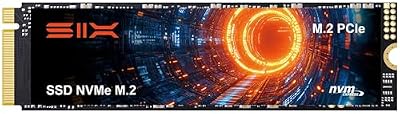
SIX NVME M.2 SSD PCIe 4.0-1TB m.2 2280 ssd, Read UP to 7350MB/s 1TB for Gaming PS5 Memory Storage Expansion with Heatsink, Internal Solid State Hard Drive PCIe gen 4x4 Nvme for Laptop Desktop pc
Included for 'Best PS5 SSD Deals' as a relevant option in this category; details come from the product listing.
View on AmazonThe SIX NVME M.2 SSD PCIe 4.0 1TB is a budget-tier 2280 drive rated up to 7,350MB/s, and that figure is what puts it on this list. It is unusual for the cheapest end of the market to advertise a sequential read number in the 7,300MB/s range, because most budget drives sit well below it. That rating, if it holds under real workloads, puts it squarely inside Sony’s performance envelope.
Who it suits. This is for the buyer whose primary constraint is price and who is willing to accept a lesser-known brand in exchange for a specification sheet that looks like a mid-range drive. It suits second-console owners, people upgrading an older PS5 on a tight budget, and anyone treating the expansion slot as a place to park a rotating library of games rather than as permanent primary storage.
Key specs.
- Capacity: 1TB
- Form factor: M.2 2280
- Interface: PCIe 4.0 NVMe
- Sequential read: up to 7,350MB/s
- Heatsink: check the specific listing — budget drives vary, and a heatsink is effectively mandatory in a PS5
- Brand: SIX
Strengths. The core strength is the ratio of advertised speed to price tier. A 7,350MB/s read rating at a budget price is a genuinely attractive specification, and for game storage the console only cares that the drive clears its threshold consistently. If it does, the experience is the same as a drive costing considerably more: games install, load and update at console-native speeds.
Installing a drive in a PS5 is a five-minute job — remove the side panel, unscrew the bay cover, seat the drive at an angle, screw it down, replace the cover, format in Settings. A cheap drive that meets spec therefore delivers almost the entire benefit of an expensive one, because the console hardware normalises the experience. That is the case for buying at the bottom of the market rather than the middle.
Pros
- Up to 7,350MB/s read rating, which is inside the PS5’s required performance band
- Budget price tier — the lowest cost way onto this list with a credible spec
- M.2 2280 fits the console’s expansion slot
- Good choice for a secondary or rotating game library
Cons
- Lesser-known brand, so long-term warranty support is harder to predict
- Heatsink inclusion is not guaranteed across every listing variant — verify before buying
- Peak sequential figures on budget drives often depend on cache state and can fall off under sustained writes
- No published track record in consoles, unlike WD_BLACK or Samsung
How it compares with the nearest alternative. The direct competitor is the fanxiang S660 1TB. The S660 is slower on paper — up to 5,000MB/s — but it ships with a heatsink and comes from a brand with a wider PS5-focused product line. If the SIX listing you are looking at includes a heatsink, it is the faster drive and the better buy. If it does not, factor in the cost and fitting of a separate heatsink, at which point the S660 often works out simpler and no more expensive.
4. fanxiang 1TB PS5 NVMe with Heatsink – Best for a budget drive that arrives ready to fit

fanxiang 1TB NVMe Internal Gaming SSD for PS5 with Heatsink, Up to 7000MB/s M.2 SSD PCIe Gen 4 SSD Storage Expansion Compatible with PS5, Internal Solid State Drive for Gamers, Professionals, Creators
Included for 'Best PS5 SSD Deals' because the listing specifies Internal Solid State Drive for Gamers and Professionals, details this guide uses to compare options.
View on AmazonThe fanxiang 1TB NVMe for PS5 with heatsink is a Gen 4 M.2 2280 drive rated up to 7,000MB/s and supplied with the heatsink already attached. It sits in the mid-range price tier but behaves like a budget-conscious purchase, because the bundled cooler means there is nothing else to buy. The 7,000MB/s rating clears Sony’s requirement with room to spare.
Who it suits. This is the pick for someone who wants a PS5-specific drive, wants the cooling sorted out of the box, and does not want to pay licensed-brand money. It is a sensible default for a first SSD upgrade on a console that is otherwise working fine.
Key specs.
- Capacity: 1TB
- Form factor: M.2 2280
- Interface: PCIe Gen 4 NVMe
- Sequential read: up to 7,000MB/s
- Heatsink: included
- Brand: fanxiang
Strengths. The combination of a 7,000MB/s rating and an included heatsink at this price tier is the whole argument. Every additional component you have to source separately is a chance to get the wrong size, the wrong thickness or a thermal pad that does not make contact. A pre-fitted heatsink removes that entire category of error. The drive is also explicitly marketed for PS5 expansion, which means the heatsink dimensions were chosen with the console bay in mind rather than copied from a desktop design.
fanxiang has built a broad catalogue of PS5-targeted NVMe drives across several capacity and speed tiers, which is a meaningful signal at the budget end of the market: the brand is specialised in this use case rather than a generalist dipping in. That specialisation tends to show up in details like heatsink clearance and screw alignment.
Pros
- Up to 7,000MB/s read — comfortably above the PS5’s requirement
- Heatsink included and pre-fitted, so installation is a single step
- Marketed specifically for PS5 expansion
- Mid-range price for budget-adjacent convenience
Cons
- Rated read speed is below the 7,300–7,400MB/s of the top drives in this list
- Not an officially licensed Sony part
- 1TB only — no larger capacity in this exact model line
How it compares with the nearest alternative. The nearest alternative is the fanxiang S660 1TB, which is cheaper but rated at only up to 5,000MB/s. The 7,000MB/s model is the one to choose if the price gap is small, because it gives more headroom above the console’s threshold and will age better as game installs grow. Against the SIX drive, this one wins on cooling certainty and brand specialisation, while the SIX wins on peak rated read speed. It also sits below the Lexar NM790 on paper, but at a lower price tier, so the decision is straightforward value arithmetic.
5. MOVE SPEED HB7450 2TB – Best for mid-priced 2TB with TLC NAND

MOVE SPEED HB7450 2TB SSD for PS5 with Heatsink TLC NAND, PCIe 4.0 NVMe M.2 Internal Solid State Drive - Up to 7450MB/s, 3D Storage Expansion Compatible with PS5, Desktops and Laptops
Included for 'Best PS5 SSD Deals' because the listing specifies PCIe 4.0 NVMe M.2 Internal Solid State Drive and Up to 7450MB/s, details this guide uses to compare options.
View on AmazonThe MOVE SPEED HB7450 2TB is a PCIe 4.0 NVMe M.2 drive for PS5 with a heatsink and TLC NAND, and the NAND type is the detail worth paying attention to. Many budget drives use QLC NAND, which stores more bits per cell but writes more slowly and wears out sooner. TLC NAND at 2TB with a bundled heatsink at a mid-range price is a genuinely strong combination for console use.
Who it suits. This is the pick for the buyer who wants 2TB — the capacity where a PS5 library stops feeling cramped — but does not want to pay the premium tier for it. It suits players who install several large games at once and delete nothing, and anyone who expects to keep the console for years and wants the drive to outlast the warranty.
Key specs.
- Capacity: 2TB
- Form factor: M.2 2280
- Interface: PCIe 4.0 NVMe
- NAND: TLC
- Heatsink: included
- Brand: MOVE SPEED
Strengths. TLC NAND is the headline advantage. Compared with QLC, TLC cells tolerate far more write cycles before degrading, and they maintain write speed better once the drive’s SLC cache is exhausted. On a PS5 that matters during large game installs and patches, which are exactly the sustained-write workloads where QLC drives slow down. A 2TB TLC drive with a heatsink is close to the ideal profile for console expansion: enough space to stop managing storage, enough endurance to survive a console generation, and cooling that keeps it from throttling mid-transfer.
The capacity also changes how you use the console. With 1TB of expansion plus the console’s internal storage, most players stop deleting games and start keeping a working library installed. That behavioural change is worth more day to day than any sequential speed difference between 7,000MB/s and 7,400MB/s drives, neither of which is perceptible in practice.
Pros
- 2TB capacity at a mid-range price tier
- TLC NAND — better endurance and sustained write behaviour than QLC alternatives
- Heatsink included and pre-fitted
- PCIe 4.0 NVMe, well within PS5 compatibility
- Enough space to stop routinely uninstalling games
Cons
- MOVE SPEED is a less established brand than WD_BLACK, Samsung or Lexar
- Not Sony-licensed, so you lose the guarantee of validated fit
- No publicly documented long-term failure data at console scale
How it compares with the nearest alternative. The natural comparison is the fanxiang 2TB PS5 drive, which is rated up to 7,100MB/s and also ships with a heatsink. The two are close in price tier and both are 2TB. The MOVE SPEED’s advantage is its explicitly stated TLC NAND, which is the more durable cell type; the fanxiang’s advantage is a marginally higher rated read speed and a brand known specifically for console drives. Against the WD_BLACK 2TB SN850P, the MOVE SPEED is the value play: you give up Sony licensing and brand pedigree to save a meaningful amount at the same capacity.
6. fanxiang S660 1TB – Best for the cheapest drive with cooling included

fanxiang S660 PCIe 4.0 1TB NVMe M.2 SSD for PS5 with Heatsink, Up to 5000MB/s, Internal Gaming SSD NAND SLC Cache Suitable for PS5 Enthusiasts, Technology Enthusiasts, IT Professionals
Included for 'Best PS5 SSD Deals' because the listing specifies Up to 5000MB/s and Technology Enthusiasts, details this guide uses to compare options.
View on AmazonThe fanxiang S660 is a PCIe 4.0 1TB NVMe M.2 drive for PS5 with a heatsink, rated up to 5,000MB/s, using NAND with SLC cache. At 5,000MB/s it sits just below the figure Sony’s guidance points to for full-speed operation, which is the single most important thing to understand about this drive.
Who it suits. This is the pick for the buyer whose absolute priority is spending as little as possible while still getting a drive that installs cleanly and works. It suits secondary consoles, kids’ setups, and anyone who mainly wants somewhere to put a backlog rather than somewhere to run the newest releases.
Key specs.
- Capacity: 1TB
- Form factor: M.2 2280
- Interface: PCIe 4.0 NVMe
- Sequential read: up to 5,000MB/s
- NAND: 3D NAND with SLC cache
- Heatsink: included
- Brand: fanxiang
Strengths. The best thing about the S660 is that it ships with a heatsink at a budget price. Bare budget drives force a second purchase and a fitting step, and getting heatsink thickness wrong is the most common installation problem on a PS5. The S660 sidesteps that entirely. It is also a Gen 4 drive, not Gen 3, so it uses the correct interface even if it does not saturate it.
The SLC cache helps here. A drive with a dynamic SLC cache writes quickly into a reserved high-speed area and then slows once that area fills. For console use, where writes come in bursts — a game install, a patch, a capture file — the cache makes the drive feel faster than its raw NAND in short operations, even though sustained large transfers will settle at lower speeds.
Pros
- Lowest-cost entry on this list that includes a heatsink
- PCIe Gen 4 interface, correct for the PS5 slot
- SLC cache improves short-burst write performance
- Simple, low-risk upgrade for a secondary console or backlog storage
- M.2 2280 form factor fits the expansion bay
Cons
- Up to 5,000MB/s is below the ~5,500MB/s figure Sony references — the console will accept it, but it is the slowest drive here in rated terms
- Not Sony-licensed
- Sustained write speed drops once SLC cache is exhausted
- Not the right choice if you want the fastest load times the console can deliver
How it compares with the nearest alternative. Compared with the fanxiang 1TB with heatsink rated at 7,000MB/s, the S660 is slower by a wide margin in rated terms but usually cheaper by an amount that matters at this tier. The 7,000MB/s model is the better purchase if the price difference is small, because it clears the performance threshold with margin to spare. Compared with the fanxiang 4800MB/s model, the S660 is the faster of the two and the better pick between them.
7. WD_BLACK SN850P 2TB – Best overall for most PS5 owners

WD_BLACK 2TB SN850P NVMe M.2 SSD Officially Licensed Storage Expansion for PS5 Consoles, up to 7,300MB/s, with heatsink - WDBBYV0020BNC-WRSN
Included for 'Best PS5 SSD Deals' because the listing specifies up to 7 and 300MB/s, details this guide uses to compare options.
View on AmazonThe WD_BLACK 2TB SN850P is the best overall PS5 SSD for most people. It combines the officially licensed Sony fit and heatsink of the 1TB SN850P with a 2TB capacity that puts an end to routine storage management, all at up to 7,300MB/s. If you want one purchase that resolves the console’s storage limits completely, without research or risk, this is it.
Who it suits. This is for the player who has been deleting games to make room and is tired of it. It suits anyone who values the Sony licensing label, anyone who wants brand-name warranty support, and anyone who would rather buy once at a higher price tier than buy twice. It is also the safest recommendation for a less technical buyer or a gift.
Key specs.
- Capacity: 2TB
- Form factor: M.2 2280
- Interface: PCIe Gen 4 NVMe
- Sequential read: up to 7,300MB/s
- Heatsink: included, officially licensed for PS5
- Brand: WD_BLACK (Western Digital)
Strengths. The combination of licensing, capacity and support is what makes this the default recommendation. Sony-licensed means the heatsink and drive together are validated to fit and cool correctly in the console bay — no measuring, no returns. At 2TB you get enough room for a large library installed simultaneously, which is the actual problem most PS5 owners are trying to solve. The console’s internal storage fills up fast once a handful of modern releases are installed, and 2TB of expansion plus internal space is the point where storage stops being a consideration.
Up to 7,300MB/s clears Sony’s requirement with margin. Western Digital’s warranty and support processes are well established, which is meaningful for a component you install inside a console and then forget about for years. And because the 2TB SN850P is the same design as the 1TB version, buyers who start with the smaller drive and later want more space already know exactly what they are getting.
Pros
- 2TB — the capacity where a PS5 library stops feeling constrained
- Officially licensed by Sony, with validated heatsink and fit
- Up to 7,300MB/s read
- Strong brand warranty and support infrastructure
- Best overall balance of capacity, fit confidence and performance
Cons
- Premium price tier — the licensed label and brand carry a cost
- Not the cheapest route to 2TB; the MOVE SPEED HB7450 gets you there for less
- Rated read speed is marginally below the fastest drives here, though not perceptibly so in use
How it compares with the nearest alternative. Against the MOVE SPEED HB7450 2TB, this is the licensed-and-supported option versus the value option: both give you 2TB and a heatsink, but the WD_BLACK adds official Sony validation and a stronger warranty footprint. Against the Samsung 990 PRO 2TB with heatsink, the two are directly comparable premium 2TB drives; the SN850P’s distinguishing feature is the PS5 licensing, while the Samsung’s is its reputation as a top-tier Gen 4 drive. Against the Lexar 4TB NM790, the 4TB drive wins on sheer capacity — if you want never to think about storage again, go there; if 2TB is enough, the SN850P is the more reassuring purchase.
8. fanxiang 1TB Gen4 4800MB/s – Best for cheap secondary storage

Fanxiang 1TB NVMe SSD PCIe Gen4 M.2 Internal Gaming SSD for PS5, Up to 4800 MB/s, 3D NAND SLC Cache Solid State Drive Upgrade Storage for PC/Laptops S690Q
Included for 'Best PS5 SSD Deals' because the listing specifies Up to 4800 MB/s, details this guide uses to compare options.
View on AmazonThe fanxiang 1TB PCIe Gen 4 NVMe drive is rated up to 4,800MB/s and uses 3D NAND with SLC cache. It is one of the slower drives on this list, and its placement reflects that: this is a drive for parking a backlog, not for running the games you play every day.
Who it suits. This suits the player who already has adequate primary storage and wants somewhere inexpensive to keep a rotating set of older games installed. It also suits anyone with a Gen 4 slot in an older PC or a secondary console who mainly cares about price and capacity.
Key specs.
- Capacity: 1TB
- Form factor: M.2 2280
- Interface: PCIe Gen 4
- Sequential read: up to 4,800MB/s
- NAND: 3D NAND with SLC cache
- Brand: fanxiang
Strengths. The appeal is price and the Gen 4 interface. A 1TB Gen 4 drive with 3D NAND and SLC cache at the budget tier is a cost-effective way to add a terabyte. The SLC cache keeps short operations responsive even though the sustained throughput is modest. And because it is Gen 4 rather than Gen 3, it will work in the PS5 expansion slot without compatibility concerns.
If your use case is genuinely cold storage — a library of games you dip into occasionally — this drive does the job and the speed ceiling rarely becomes visible. The PS5 can read from it and run games from it; it simply will not be the fastest possible expansion.
Pros
- Budget price for a 1TB Gen 4 drive
- 3D NAND with SLC cache
- M.2 2280 fits the PS5 slot
- Fine as a rotating game library or secondary drive
Cons
- Up to 4,800MB/s is the lowest rated read speed on this list and below the level Sony references for full-speed expansion
- No heatsink is guaranteed on this model line — check the listing carefully, because a PS5 expansion drive needs cooling
- Slowest option here for load-heavy titles
- Not a good primary upgrade choice
How it compares with the nearest alternative. The fanxiang S660 is the closest alternative and is the better buy: it includes a heatsink and is rated faster. The only reason to choose this 4,800MB/s model over the S660 is if it is meaningfully cheaper and you already own a heatsink that fits. Compared with the SIX 1TB drive at up to 7,350MB/s, this model is comprehensively beaten on performance at a similar budget tier — so unless the price gap is large, the SIX is the stronger budget pick.
9. Samsung 990 PRO 2TB with Heatsink – Best for brand pedigree and warranty confidence

SAMSUNG 990 PRO w/ Heatsink SSD 2TB, PCIe Gen4 M.2 2280 Internal Solid State Hard Drive, Seq. Read Speeds Up To 7,450MB/s for High End Computing, Workstations, Compatible w/ PlayStation 5, MZ-V9P2T0CW
Included for 'Best PS5 SSD Deals' because the listing specifies PCIe Gen4 M.2 2280 Internal Solid State Hard Drive and Seq. Read Speeds Up To 7, details this guide uses to compare options.
View on AmazonThe Samsung 990 PRO 2TB with heatsink is a PCIe Gen 4 M.2 2280 drive from the most recognisable name in solid state storage. It is a premium-tier purchase and it is positioned here for buyers who weight brand reputation, warranty support and long-term reliability above capacity per dollar.
Who it suits. This is for the buyer who wants a known quantity. It suits anyone who has used Samsung SSDs before, anyone who wants the widest possible support network if something fails, and anyone who values the drive’s dual role — it is a superb PC drive as well as a PS5 expansion option, so it can be repurposed if the console is retired.
Key specs.
- Capacity: 2TB
- Form factor: M.2 2280
- Interface: PCIe Gen 4 NVMe
- Heatsink: included
- Brand: Samsung
- Positioning: premium tier, top-of-line Gen 4 performance class
Strengths. Samsung’s standing in the SSD market is the core strength. The 990 PRO line is positioned as a flagship Gen 4 product, and the heatsink version is designed to sustain high performance under extended load rather than just burst quickly. For a console, sustained behaviour matters more than peak numbers, because game installs and patches write for minutes at a time.
The 2TB capacity pairs with that performance to make a drive that will feel current for years. Samsung’s warranty processes and support channels are among the most established in the industry, which is real value on a component that lives inside a console. And because the 990 PRO is a mainstream flagship, it is equally at home as a PC boot drive — if you ever move on from the PS5, the drive keeps its usefulness rather than becoming stranded.
Pros
- 2TB capacity
- Premium heatsink designed for sustained load
- Highest brand recognition and support footprint in the storage market
- Equally strong as a PC drive, so the investment transfers
- Flagship Gen 4 performance class
Cons
- Premium price tier — one of the more expensive ways to get 2TB of PS5 storage
- Not officially Sony-licensed, though it is widely used in the console
- No capacity advantage over the WD_BLACK 2TB SN850P and the MOVE SPEED HB7450, both of which cost less
How it compares with the nearest alternative. The direct rival is the WD_BLACK 2TB SN850P. Both are premium 2TB Gen 4 drives with heatsinks. The SN850P’s edge is official PS5 licensing; the 990 PRO’s edge is Samsung’s reputation and its dual-purpose strength as a PC drive. If the drive will only ever live in the console, the licensed SN850P is slightly easier to justify. If you might move it to a PC later, or you simply trust Samsung more, the 990 PRO is the pick. Against the Lexar 4TB NM790, the Samsung is outgunned on capacity — but if 2TB is sufficient and brand confidence is the priority, that trade is deliberate.
10. Acer Predator GM7 1TB – Best for fast 1TB at a budget price

Acer Predator GM7 1TB SSD: M.2 2280 PCIe Gen 4 x4 NVMe 2.0, Read Speed Up to 7400 MB/s, Internal PC Solid State Drive for Laptop, Desktop and PS5 - BL.9BWWR.118
Included for 'Best PS5 SSD Deals' because the listing specifies Read Speed Up to 7400 MB/s and Internal PC Solid State Drive for Laptop, details this guide uses to compare options.
View on AmazonThe Acer Predator GM7 1TB is an M.2 2280 PCIe Gen 4 x4 NVMe 2.0 drive rated up to 7,400MB/s, sitting in the budget price tier. A 7,400MB/s read rating at budget money is the fastest specification-per-pound entry on this list, and it comes from a brand with far more consumer recognition than most budget SSD labels.
Who it suits. This suits the buyer who wants top-tier sequential speed without paying top-tier prices, and who is comfortable confirming heatsink coverage themselves. It is a strong choice for anyone building or upgrading a PC who also wants PS5 compatibility from the same drive.
Key specs.
- Capacity: 1TB
- Form factor: M.2 2280
- Interface: PCIe Gen 4 x4, NVMe 2.0
- Sequential read: up to 7,400MB/s
- Brand: Acer (Predator line)
- Heatsink: verify per listing — the GM7 family is sold in both bare and cooled configurations
Strengths. The read rating is the story: up to 7,400MB/s at a budget price tier is a specification that would have been flagship territory not long ago. NVMe 2.0 support means it is built to a current interface standard rather than an older revision. Acer’s Predator branding gives it a consumer-electronics pedigree that most budget SSD brands lack, which is reassuring when something goes wrong and you need a support channel.
For a PS5, the drive clears Sony’s performance bar easily, and the single-sided M.2 2280 profile fits the bay without obstruction. If you already own a suitable heatsink, or you buy the cooled variant, this is one of the best value-per-megabyte-per-second options on the market.
Pros
- Up to 7,400MB/s read — among the fastest ratings on this list
- Budget price tier despite the flagship-class speed rating
- PCIe Gen 4 x4 with NVMe 2.0 support
- Recognisable consumer brand with an established support presence
- Works well as a PC drive too
Cons
- Heatsink inclusion varies by listing — if it is bare, you must add cooling before PS5 use
- 1TB only on this model
- Not Sony-licensed
- Adding a heatsink separately erases some of the price advantage
How it compares with the nearest alternative. The Lexar NM790 1TB is the closest rival and the comparison is genuinely close: both are rated at 7,400MB/s, both are 1TB Gen 4 drives, and the Lexar ships with a heatsink as standard. That last point decides it — if the Acer listing does not include cooling, the Lexar is the better PS5 purchase at a similar tier. If the Acer is available with a heatsink at a lower tier, or you already own a cooler, the Predator GM7 is the sharper buy on pure speed-per-price.
11. Lexar NM790 4TB with Heatsink – Best for maximum capacity
Lexar 4TB NM790 NVMe SSD w/Heatsink, 7400/6500 MB/s, M.2 2280, PCIe Gen 4x4
Included for 'Best PS5 SSD Deals' because the listing specifies 7400/6500 MB/s and M.2 2280, details this guide uses to compare options.
View on AmazonThe Lexar NM790 4TB with heatsink is the highest-capacity drive on this list. It is rated at 7,400MB/s read and 6,500MB/s write, uses the M.2 2280 form factor, and ships with its heatsink fitted. For a PS5 owner who wants to stop thinking about storage entirely, this is the endpoint.
Who it suits. This is for the player with a very large library, a habit of never uninstalling anything, or a household where several people share one console and each wants their own games installed. It also suits anyone who simply wants to buy once and never revisit the decision.
Key specs.
- Capacity: 4TB
- Form factor: M.2 2280
- Interface: PCIe Gen 4×4, NVMe
- Sequential read: up to 7,400MB/s
- Sequential write: up to 6,500MB/s
- Heatsink: included, factory-fitted
Streets
Strengths. Capacity is the obvious one: 4TB of expansion alongside the console’s internal storage is enough that storage management stops being a chore. The 7,400MB/s read and 6,500MB/s write ratings mean there is no performance compromise for the extra space — this drive is as fast on paper as the 1TB version. The bundled heatsink keeps the package single-purchase, and the single-sided M.2 2280 layout fits the console bay without interference.
There is also a practical endurance argument for larger drives. More capacity means the same total write load is spread across more NAND cells, so a 4TB drive generally lasts longer in write-cycle terms than a 1TB drive used the same way. If you plan to keep the console for many years and install and patch games constantly, that headroom has value beyond the convenience of extra space.
Pros
- 4TB — the largest capacity on this list by a wide margin
- 7,400MB/s read and 6,500MB/s write, matching the smaller NM790
- Heatsink included and pre-fitted
- Larger capacity spreads write load across more cells, aiding longevity
- Removes storage management as a concern entirely
Cons
- Premium price tier — the highest total spend on this list
- Not Sony-licensed
- Significant overkill for a player who regularly finishes and deletes games
- You pay for capacity you may never fill
How it compares with the nearest alternative. The nearest alternative is the WD_BLACK 2TB SN850P, the best overall pick. The comparison is simple: the SN850P gives you Sony licensing and brand support at 2TB, while the Lexar gives you double the capacity and a slightly higher rated write speed without the licensed label. If 2TB is enough, choose the SN850P for fit certainty. If you have ever run out of space twice, choose the 4TB Lexar.
12. fanxiang 2TB PS5 NVMe with Heatsink – Best for large capacity at mid-tier money
fanxiang 2TB NVMe Internal Gaming SSD for PS5 with Heatsink, Up to 7100MB/s M.2 SSD PCIe Gen 4 SSD Storage Expansion Compatible with PS5, Internal Solid State Drive for Gamers, Professionals, Creators
Included for 'Best PS5 SSD Deals' because the listing specifies Internal Solid State Drive for Gamers and Professionals, details this guide uses to compare options.
View on AmazonThe fanxiang 2TB NVMe for PS5 with heatsink is rated up to 7,100MB/s and supplied with cooling pre-fitted. It is the drive that best closes the gap between the mid-range and premium tiers: 2TB of capacity and a heatsink for less than the flagship 2TB options cost.
Who it suits. This suits the buyer who has decided they need 2TB — the capacity where the console stops feeling cramped — but does not want to pay licensed-brand prices to get it. It also suits anyone already familiar with fanxiang’s PS5 line who wants to move up in capacity.
Key specs.
- Capacity: 2TB
- Form factor: M.2 2280
- Interface: PCIe Gen 4 NVMe
- Sequential read: up to 7,100MB/s
- Heatsink: included
- Brand: fanxiang
Strengths. The specification-to-price ratio is strong: 2TB, up to 7,100MB/s and a bundled heatsink, all below the premium tier. That read rating comfortably clears Sony’s requirement, and the pre-fitted cooler removes the risk of a heatsink that does not fit. fanxiang’s catalogue is built around PS5 expansion across multiple capacities and speed tiers, which suggests the physical dimensions were chosen with the console in mind rather than adapted from a desktop design.
At 2TB, the drive changes how you use the console. You stop uninstalling games to make room, you keep a working library installed, and updates stop requiring deletions. That is the practical benefit most buyers are actually after, and it arrives here without the premium markup.
Pros
- 2TB capacity at a below-premium price tier
- Up to 7,100MB/s read, above the console’s requirement
- Heatsink included and pre-fitted
- Brand specialises in PS5-targeted drives
- Enough space to stop routine uninstalling
Cons
- Not Sony-licensed
- Slightly lower rated read speed than the 7,300–7,400MB/s drives
- Fanxiang lacks the long-term reliability data that WD_BLACK, Samsung and Lexar have accumulated
- Sits in a crowded part of the market where several rivals offer similar specs
How it compares with the nearest alternative. The MOVE SPEED HB7450 2TB is the closest competitor: also 2TB with a heatsink, also mid-range. The MOVE SPEED’s advantage is its explicitly stated TLC NAND, which is the more durable cell type; the fanxiang’s advantage is its marginally higher rated read speed and its established PS5 product line. Against the WD_BLACK 2TB SN850P, the fanxiang is the value choice — you trade the Sony licensing and the brand’s warranty footprint for a lower price at the same capacity and comparable real-world speed.
How to Choose
The PS5 expansion slot is less complicated than the marketing around it suggests. Sony publishes clear requirements, the console formats the drive itself, and once a drive meets the threshold you will not be able to tell the difference in game between a cheap one and an expensive one. The decisions that actually matter are physical fit, cooling, capacity and warranty. Here is how to work through them in order.
Start with physical fit, not speed
The PS5 accepts M.2 2280 drives — 22mm wide, 80mm long. Almost every consumer NVMe drive sold today is this size, so length is rarely a problem. The real fit risk is height. The expansion bay has a shallow cover, and a drive with a tall heatsink can obstruct it. Sony specifies a maximum thickness for the combined drive-and-heatsink assembly, and a heatsink that is too tall is the single most common reason an installation fails.
This is why pre-fitted heatsinks from console-focused brands are worth a premium: they were dimensioned for that clearance. If you are buying a bare drive and adding your own cooler, measure the assembled height before you close the bay cover, and prefer a slim or low-profile design over a chunky desktop cooler. A single-sided M.2 2280 layout also helps — it is thinner and sits flatter against the bay floor than a double-sided drive, which has components on both faces.
Then check sequential read against Sony’s threshold
Sony’s guidance for PS5 expansion calls for an NVMe drive with sequential read performance in the region of 5,500MB/s or higher. That number is the practical dividing line on this list:
- Drives rated at 7,000–7,400MB/s (Lexar NM790, WD_BLACK SN850P, SIX 1TB, fanxiang 7,000/7,100MB/s, Samsung 990 PRO, Acer Predator GM7) clear the bar with margin and will run games at console-native speed.
- Drives rated below roughly 5,500MB/s (fanxiang S660 at 5,000MB/s, fanxiang Gen4 at 4,800MB/s) will still work — the console accepts them — but they sit at or below the level Sony references, so they are better suited to secondary or backlog storage than to running your main games.
It is worth being clear about what the threshold does and does not mean. The PS5 does not reject a slower drive, and games installed on it will still launch. But once you are above the threshold, extra speed above it buys you very little, because the console’s storage pipeline — not the drive — is the bottleneck. This is the reason a 7,000MB/s budget drive can be a better buy than a 7,400MB/s one that costs more.
Never skip the heatsink
The PS5 does not ship with a heatsink for the expansion slot. The drive you install must bring its own cooling, and a bare M.2 drive running sustained game loads will heat up and throttle, which reduces performance and shortens the drive’s life. This is not a theoretical concern — it is the reason Sony specifies a heatsinked assembly and the reason console-targeted drives almost all ship with coolers fitted.
Your options, in order of convenience:
- Heatsink included and pre-fitted (Lexar NM790, WD_BLACK SN850P, fanxiang PS5 models, MOVE SPEED HB7450, Samsung 990 PRO, fanxiang S660): buy the drive and nothing else. This is the safest route and the one most readers should take.
- Heatsink sold separately: viable and often cheaper, but you must buy a cooler that fits the PS5 bay’s height limit, apply a thermal pad correctly, and check the assembled thickness. Budget for the cooler in your cost comparison.
- No heatsink: not appropriate for PS5 expansion. If a listing shows a bare drive, add cooling before installing it.
Work out capacity from your actual habits
Capacity is where most buyers underestimate their needs. Modern games routinely occupy tens of gigabytes each, with large releases often exceeding 100GB once patches and expansions are included. Two or three of those will consume a meaningful share of the console’s internal storage. A 1TB expansion drive gives you roughly a terabyte of additional room minus formatting and system overhead; 2TB doubles it; 4TB makes the question effectively disappear.
A rough way to size it: count the games you currently have installed, add the ones you keep meaning to reinstall, and estimate the total at your typical game size. If that number is under a terabyte, a 1TB drive is fine. If it is between one and two terabytes, buy 2TB — this is the sweet spot for most players and the point at which you stop deleting games. If you share the console, keep a large library, or simply know you will not manage it, 4TB is the honest answer.
Cost per terabyte is the metric to use when comparing across capacities, and it consistently favours the larger drives. A 2TB drive at a mid-range tier usually costs well under twice what the equivalent 1TB costs, and a 4TB drive at a premium tier costs less than four times the 1TB price. If the budget stretches, buying capacity up front is almost always better value than buying twice.
Weigh warranty and brand support realistically
A PS5 SSD is a component you install once and then forget about. That makes warranty coverage and support infrastructure more important than they feel at the point of purchase. Established brands — WD_BLACK, Samsung, Lexar — have well-documented support channels, clear warranty terms and long track records. Budget brands often offer comparable headline warranties but with less predictable support experiences.
The practical question is what a failure would cost you. If the drive fails, you lose the money and the games installed on it (though cloud saves and re-downloading mitigate the data loss). For most buyers this argues for a mid-range or premium drive from a known brand as the primary expansion, and a cheaper drive for secondary storage. It is a reasonable split: spend where reliability matters, save where it matters less.
A decision matrix for your situation
| Your situation | What to prioritise | Recommended pick |
|---|---|---|
| Want the safest, most supported option and 2TB is enough | Sony licensing, brand warranty, pre-fitted heatsink | WD_BLACK 2TB SN850P |
| Lowest possible spend, primary use is backlog storage | Lowest price with a heatsink included | fanxiang S660 1TB |
| Want maximum speed per pound at 1TB | Highest rated read speed at budget tier | Acer Predator GM7 1TB or SIX 1TB |
| Shared console, never delete anything | Maximum capacity with no performance compromise | Lexar 4TB NM790 |
| Want 2TB without premium pricing | TLC NAND for endurance, bundled cooling | MOVE SPEED HB7450 2TB |
| Want 2TB and the strongest brand reputation | Flagship Gen 4 standing and support network | Samsung 990 PRO 2TB |
| Already own a heatsink that fits | Bare drive at the best price per terabyte | SIX 1TB or Acer Predator GM7 1TB |
| Want a PS5-specific drive at mid-range money | Brand specialised in console drives | fanxiang 1TB 7,000MB/s or fanxiang 2TB |
Installation and the mistakes people make
Installing a PS5 SSD is a genuinely short job, but a few errors are common enough to be worth naming.
- Forgetting the spacer or screw. The drive sits on a standoff and is held by a single screw. If the standoff is set to the wrong hole for an 80mm drive, the screw will not line up. Move the spacer to the 2280 position before seating the drive.
- Not seating the drive at an angle. The connector is angled; pushing a drive in flat can damage the slot or leave a poor contact. Insert at roughly 30 degrees, then press down and secure.
- Closing the bay cover over an oversized heatsink. If the cover does not sit flush, stop. Do not force it. A heatsink that is too tall needs replacing, not squeezing.
- Skipping the format step. After the hardware is installed, the console will not see the drive until you go into Settings, Storage and format the M.2 SSD. This is a normal step, not a fault.
- Unplugging mid-transfer. Once games are on the drive, avoid interrupting large moves. Power loss during a sustained write is the least forgiving moment for any SSD.
- Assuming the console’s internal SSD can be swapped. It cannot. The internal drive is soldered; the expansion slot is the only upgrade path.
What wears out and what does not
An SSD has no moving parts, so the failure modes are different from a mechanical hard drive. What eventually limits an SSD’s life is write endurance — the number of times its NAND cells can be written before they degrade. Reads are essentially free. This has a practical consequence: installing and patching games is the workload that ages the drive, and playing them is not.
The good news is that console use is not especially write-heavy compared with, say, video editing or database work. A modern TLC drive at 2TB or 4TB has far more endurance than a typical PS5 will ever consume. QLC drives have lower endurance, which is one reason TLC NAND, as used by the MOVE SPEED HB7450, is worth preferring where the price is close. The other wear item is thermal: sustained high temperatures accelerate degradation, which is why the heatsink is not optional.
In practice, the component most likely to be replaced first is not the SSD but the whole console. Buy a drive with adequate capacity, fit it with proper cooling, format it, and it will outlast the machine.
Frequently Asked Questions
Do I need a heatsink on a PS5 SSD?
Yes. Sony does not supply a heatsink for the expansion slot, and the drive is expected to bring its own cooling. A bare M.2 drive under sustained game loads will heat up and throttle, which reduces performance and accelerates wear. Every drive recommended here either includes a heatsink or is flagged as needing one added. If you buy a bare drive, budget for a slim cooler that fits the bay’s height limit.
What is the fastest SSD the PS5 supports?
The PS5 uses a PCIe Gen 4 interface, so any Gen 4 NVMe drive that meets Sony’s performance guidance will run at effectively console-native speed. Several drives on this list are rated at 7,300–7,400MB/s, which is at the top of what the interface can deliver. Beyond that threshold, extra rated speed does not translate into noticeably faster game loads, because the console’s storage pipeline is the limiting factor.
Can I use a Gen 3 SSD in a PS5?
The expansion slot is a Gen 4 slot, and physically a Gen 3 M.2 drive will fit. However, Gen 3 drives are generally well below the performance level Sony references for expansion, so they are not a good choice for running games. They can work as inexpensive secondary storage in some setups, but you would be leaving most of the slot’s capability unused. Stick to Gen 4 drives.
How much capacity do I actually need?
Most players are well served by 2TB of expansion. Large modern games often exceed 100GB once patches and expansions are counted, so the console’s internal storage fills quickly. Adding 2TB is the point at which most people stop deleting games to make room. A 1TB drive is fine if you finish and remove games regularly; 4TB suits shared consoles and very large libraries.
Is cost per terabyte lower on bigger drives?
Almost always, yes. A 2TB drive at a mid-range price tier typically costs well under twice what the equivalent 1TB costs, and a 4TB premium drive costs less than four times a 1TB drive at the same tier. If your budget can stretch, buying capacity upfront is usually better value than buying a small drive now and replacing it later. It also avoids paying twice for the heatsink and the installation effort.
Does a PS5 SSD need to be Sony-licensed?
No. Licensing indicates the manufacturer has validated the drive and heatsink for the console’s bay, which removes fit and clearance uncertainty. It is a confidence feature rather than a functional requirement. Many widely used drives, including the Lexar NM790 and Samsung 990 PRO, are not licensed and work well. If you are comfortable checking clearance and thickness yourself, you can save money by choosing an unlicensed drive with the right specifications.
How long should a PS5 SSD last?
Longer than the console in most cases. SSDs are limited by write endurance, and console use — installing games, applying patches, recording clips — is a light-to-moderate write workload compared with professional applications. A TLC drive at 2TB or 4TB will typically have far more endurance than a PS5 will consume over its lifetime. Heat is the main factor that shortens drive life, which is why proper cooling matters more than any other single choice.
Can I move a PS5 SSD to a PC later?
Yes, and it is a good reason to favour mainstream drives. Any M.2 2280 PCIe Gen 4 NVMe drive can be used in a desktop or laptop with a compatible slot. You will need to reformat it, which erases the console’s game data, but the hardware itself remains useful. Drives like the Samsung 990 PRO and Acer Predator GM7 are particularly strong here because they are designed primarily as PC drives and are equally at home in a console.
Why does my PS5 not see the new SSD?
The most common cause is that the drive has not been formatted. After installing the hardware, the console requires you to go into Settings, then Storage, and format the M.2 SSD before it appears as usable space. If it still does not appear, check that the drive is fully seated in the slot at the correct angle, that the retention screw is fixed, and that the standoff is in the 2280 position. A drive that is not detected at all usually indicates a seating problem rather than a faulty drive.
Final Recommendation
If you want the safest overall choice: the WD_BLACK 2TB SN850P. It is officially licensed, ships with a validated heatsink, gives you enough capacity to stop managing storage, and comes with established brand support. It is the pick most PS5 owners should make.
If your budget is the deciding factor: the fanxiang S660 1TB is the cheapest drive here that includes a heatsink, and the SIX 1TB or Acer Predator GM7 1TB are the fastest budget-tier options if you can source cooling separately.
If you never want to think about storage again: the Lexar 4TB NM790 makes the question disappear entirely, with 7,400MB/s read and 6,500MB/s write in the same slim, single-sided, heatsinked package as its smaller sibling.
If you want 2TB without premium money: the MOVE SPEED HB7450 2TB stands out for its TLC NAND, and the fanxiang 2TB offers a comparable package from a brand focused on console drives.
If brand confidence outweighs price: the Samsung 990 PRO 2TB with heatsink is the premium choice, and it doubles as an excellent PC drive if you ever retire the console.

Write Your Review
No reviews yet. Be the first to share your experience!